---
title: "Vue.js 3 Meets Drupal: an Integration Guide"
url: "https://www.sparkfabrik.com/en/engineering/integrating-multiple-vue-apps-in-drupal/"
lang: "en"
type: "engineering-post"
date: "2026-04-16"
lastmod: "2026-04-16"
author: "Luigi Cavalieri"
description: "A short how-to on the integration of multiple Vue.js 3 apps into a Drupal-based website."
tags: ["drupal","vue.js","vite","custom module","custom block"]
image: "https://www.sparkfabrik.com/images/og/engineering-integrating-multiple-vue-apps-in-drupal-en.webp"
schema: {"@context":"https://schema.org","@type":"BlogPosting","author":{"@type":"Person","name":"Luigi Cavalieri"},"dateModified":"2026-04-16T09:00:00+00:00","datePublished":"2026-04-16T09:00:00+00:00","description":"A short how-to on the integration of multiple Vue.js 3 apps into a Drupal-based website.","headline":"Vue.js 3 Meets Drupal: an Integration Guide","image":"https://www.sparkfabrik.com/images/og/engineering-integrating-multiple-vue-apps-in-drupal-en.webp","inLanguage":"en","publisher":{"@type":"Organization","name":"SparkFabrik","url":"https://www.sparkfabrik.com"},"url":"https://www.sparkfabrik.com/en/engineering/integrating-multiple-vue-apps-in-drupal/"}
---
# Vue.js 3 Meets Drupal: an Integration Guide
A short how-to on the integration of multiple Vue.js 3 apps into a Drupal-based website.
- Author: [Luigi Cavalieri](https://www.sparkfabrik.com/en/engineering/authors/lcavalieri/)
- Published: 2026-04-16
- Topic: [Software development](https://www.sparkfabrik.com/en/engineering/families/dev/)
- Tags: drupal, vue.js, vite, custom module, custom block

*Vue.js 3 Meets Drupal: an Integration Guide*
Looking back at my first year at SparkFabrik, I was amazed at how much trust Spark put in me. The magnitude of the projects I'm having the opportunity to contribute to, has been the turning point in my journey as a front-end developer. No more words are needed to say that the time to share something I learned had undoubtedly come. And so here we are! At the start of a post about the integration of multiple Vue.js 3 apps in a Drupal-based website.
When we need to add interactive sections to a Drupal website, the first thought goes to [Drupal behaviors](https://www.drupal.org/docs/drupal-apis/javascript-api/javascript-api-overview#s-drupalbehaviors-compared-to-jquerydocumentready-for-deferring-execution). Plain JavaScript plays really well in adding interactivity to a website, but when these sparks of life start to turn into more complex implementations, the introduction of a framework is a no-brainer. A cleaner, more maintainable codebase is something to always strive for, if we aim at building a structured project that in the long run piles up as little tech debt as possible.
Just a side note: Vue.js isn't the only viable solution to the aforementioned problem of course, but it surely is the go-to framework when the objective is to integrate in a Drupal website many lightweight JavaScript apps offspring of an automated build step.
## A Custom Module is Our Starting Point
The basic idea is to be able to develop all our Vue.js apps inside a custom module that registers one custom block for each app. So that adding a Vue.js app to a webpage will actually boil down to placing a block into a region of that page. In other words, it will be a native Drupal experience.
To start with, let's create a new folder, `vue_apps`, inside `web/modules/custom`, with just a basic `vue_apps.info.yml` file into it:
```yaml
# web/modules/custom/vue_apps/vue_apps.info.yml
name: Vue Apps Module
type: module
description: "Vue apps for my Drupal 11 site"
package: Custom
core_version_requirement: ^10 || ^11
```
Before going on, we don't have to forget to enable the just created custom module:
```bash
$ drush en vue_apps
```
Next, as anticipated, we need a custom block for each of our Vue.js apps.
At the very least, each block must do two things:
1. Add to the hosting webpage a container (HTML tag) inside which Vue.js will render the app
2. Tell Drupal to include a library composed of at least the compiled JavaScript of the app
And this translates into creating the folder `vue_apps/src/Plugin/Block`, where we will save our custom block files, each following a blueprint similar to this one:
```php
'',
'#attached' => [
'library' => [
'vue_apps/vue.banner',
],
],
];
}
}
```
## Setting up the Vue.js 3 project
Let's have some fun now!
What we have to do at this point is the following:
1. Create a new Vue.js 3 project named `vue`
2. Add the source code of our apps to the bundle
3. Customize Vite's configuration so that when we build the project, the `dist` folder will contain at the very least these JavaScript files:
- One `.js` for each app
- One `.js` for all our custom code shared among our apps
- One `.js` for all the vendors' related code included in our apps
The final structure of our custom module's folder will be something like this:
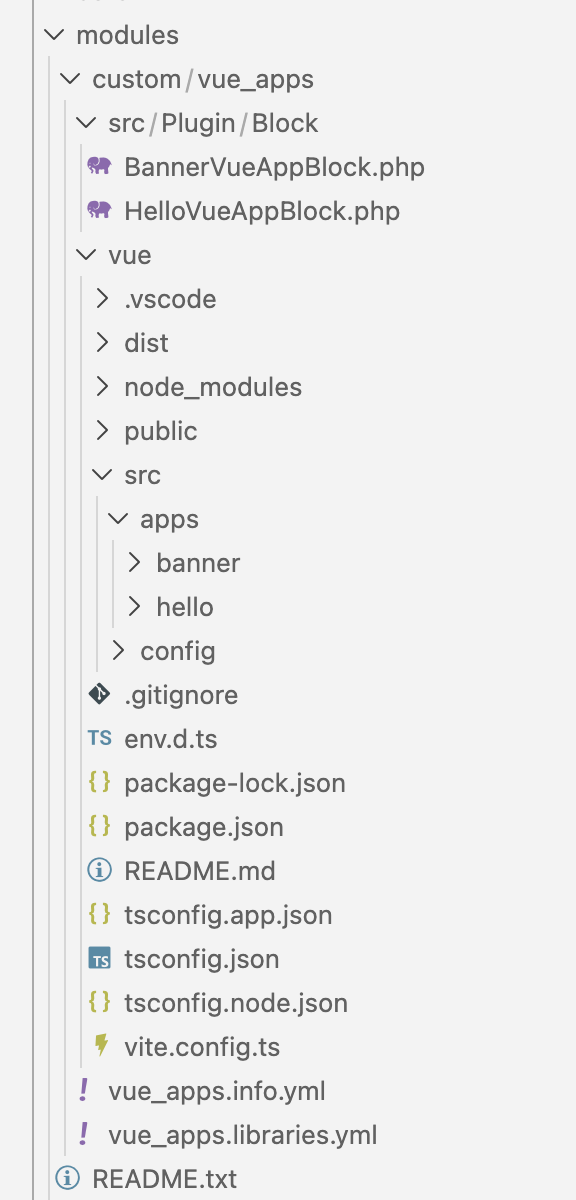
*The final structure of our custom module*
### Scaffolding the Vue.js project
The most straightforward way to complete the first step, is to use `create-vue`, the official scaffolding tool of Vue.js:
```bash
$ cd web/modules/custom/vue_apps
$ npm create vue@latest
```
Even though the features you'll enable during this setup process strictly depend on your project's needs, whenever possible, I strongly recommend to enable TypeScript, not only to uplift your development experience, but also to reduce the likelihood to be faced with runtime errors.
### Fueling our Creativity
The second step starts by replacing the whole content of the `vue_apps/vue/src` folder, with a subfolder, namely an `apps` folder, coupled with any other directory or loose file your creativity will need to develop your apps. More than anything else, at this stage there are three main things we have to take care of:
1. the source code of each Vue.js app is saved in a distinct subfolder of `vue_apps/vue/src/apps`
2. all the code common to two or more of your apps is saved in directories that are siblings of `vue_apps/vue/src/apps`
3. each one of your apps is mounted in an HTML element whose id is the same used inside your custom block
For example, the Vue.js app for our custom block `BannerVueAppBlock` would be mounted as follows:
```ts
// web/modules/custom/vue_apps/vue/src/apps/banner/main.ts
import { createApp } from 'vue'
import App from './App.vue'
createApp(App).mount('#banner-vue-app')
// web/modules/custom/vue_apps/vue/src/apps/banner/App.vue
We are
![SparkFabrik]()
```
### The Custom Vite Configuration
By default, `create-vue` scaffolds projects that are supposed to be Single Page Applications (SPA). That's the reason why in the project there is an `index.html` file, the entry point of every SPA. However, our goal is to be allowed to launch `npm run build` and automagically find all our compiled Vue.js apps each in their own file under the `dist` folder. To achieve this, we have to customize a little the `vite.config.ts` file.
In practice, what has to be done is something like this:
```ts
// web/modules/custom/vue_apps/vue/vite.config.ts
import { fileURLToPath, URL } from "node:url";
import { resolve } from "node:path";
import { defineConfig } from "vite";
import vue from "@vitejs/plugin-vue";
import vueDevTools from "vite-plugin-vue-devtools";
// https://vite.dev/config/
export default defineConfig({
plugins: [vue(), vueDevTools()],
resolve: {
alias: {
"@": fileURLToPath(new URL("./src", import.meta.url)),
},
},
build: {
outDir: "dist",
emptyOutDir: true,
minify: true,
rollupOptions: {
input: {
hello: resolve(import.meta.dirname, "src/apps/hello/main.ts"),
banner: resolve(import.meta.dirname, "src/apps/banner/main.ts"),
},
output: {
entryFileNames: "js/[name].js",
assetFileNames: "assets/[name].[ext]",
manualChunks: (id) => {
if (id.includes("node_modules")) {
return "vendor";
}
},
chunkFileNames: (chunkInfo) => {
if (chunkInfo.name === "vendor") {
return "js/chunk-vendor.js";
}
return "js/chunk-common.js";
},
},
},
},
});
```
The main addition to the default configuration has been the `build` object. As you can read, the key point of all our customization is the `rollupOptions` entry (Rollup is Vite's bundler):
- The **input** object's entries are one for each of our apps. The key of each entry is the name of the final, vanilla JavaScript file. The value is the absolute path to the main source file of the app.
- The **manualChunks** and **chunkFileNames** are the callbacks used to direct all the code coming from the `node_modules` folder to a `chunk-vendor.js` file, and all the code that is common to our apps (namely all the code outside the `vue_apps/vue/src/apps` folder but inside `vue_apps/vue/src`) to a `chunk-common.js` file.
- **entryFileNames** tells Rollup the pattern to follow for the filename of the JavaScript files.
- And finally, **assetFileNames** instructs Rollup about the pattern of the filename for all other files, for example, CSS and media files (more on this later).
_It is important to note that the main purpose of the `entryFileNames` and `assetFileNames` settings is to get rid of the random, default tokens Rollup includes in the filename of our final JavaScript files._ As you will find out in a moment, we need predictable and immutable filenames for the whole setup to work: cache busting will be automatically handled by Drupal itself.
Now we can safely dispose of the `vue_apps/vue/index.html` file, because it's no longer needed for our multi-app setup. And if we try to launch `npm run build` at this very moment, all of the artifacts of the build step we will need to render our apps, will be neatly saved to the `vue_apps/vue/dist` folder.
## The Missing Piece: the Drupal Libraries Definitions
When we created the custom Drupal blocks, we said that each block carries with it a Drupal library responsible for instructing Drupal about the files each app needs to be rendered. So the final step is to define such libraries in a freshly created file by the filename of `vue_apps/vue_apps.libraries.yml`:
```yaml
# web/modules/custom/vue_apps/vue_apps.libraries.yml
vue.base:
js:
vue/dist/js/chunk-vendor.js:
attributes:
type: module
vue/dist/js/chunk-common.js:
attributes:
type: module
vue.hello:
js:
vue/dist/js/hello.js:
attributes:
type: module
css:
theme:
vue/dist/assets/hello.css: {}
dependencies:
- vue_apps/vue.base
vue.banner:
js:
vue/dist/js/banner.js:
attributes:
type: module
css:
theme:
vue/dist/assets/banner.css: {}
dependencies:
- vue_apps/vue.base
```
Nothing new for a Drupal developer: one library per app with the addition of a shared `vue.base` library. However, two things are worth a closing comment:
- The final JavaScript files compiled for us by Vite are _not_ old-fashioned plain JS files, but they are instead **modern JavaScript modules**, which include `export` and `import` statements. So they must be loaded as such by Drupal, otherwise they simply would not work.
- Handling the production of the stylesheets, and any other kind of asset your apps need, in the Vue.js project, isn't a mandatory rule to follow. Here, I did it to show that if you need to, the stylesheets too can be managed in the Vue.js project, but in a real-world scenario it's very likely that these assets have to go in your custom theme, whose SCSS part already has all you need to style your apps as per the design system used for your project.
### Thanks
With the hope that you now have a more clear idea of how to give your Drupal project sparks of interactivity powered by Vue.js 3, I thank you very much for reading about a fragment of knowledge I as much enjoyed acquiring as I enjoyed sharing.
Stay around! But most of all, _never lose your spark!_
---
This is the Markdown version of an Engineering page of SparkFabrik, for AI agents and crawlers. The full page is at https://www.sparkfabrik.com/en/engineering/integrating-multiple-vue-apps-in-drupal/.